SitecoreAI
Users navigating to Spark directly through their SitecoreAI marketplace link will have an account in Spark automatically created and associated to their SitecoreAI user.
However, aside from the initial user, who will be assigned as an Admin user, all new users will be assigned a client (read only) role to the environment. The Admin user must log in, navigate to the "Users" area and update user permissions where relevant. See below for administering users.
Users must be assigned the Admin role to allow them to administer other users.
Creating or editing a user
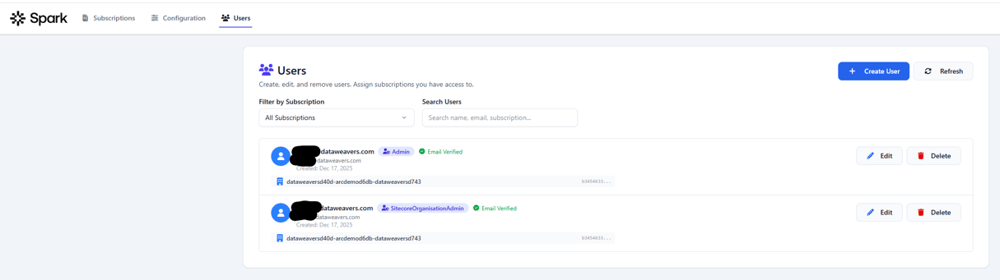
An admin user will see a “Users” navigation at the top of the Spark interface. Clicking this will display the users currently associated to the organisation.
If a user has created an account or navigated into the Spark interface through the Sitecore AI marketplace before they will have an existing user account. Other users will need an user creating, click the "Create User" button to create a new user and fill in all details:
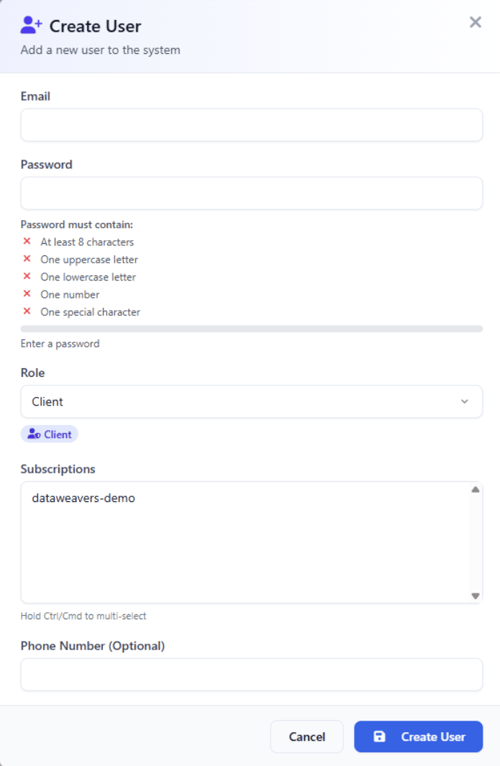
Be sure to select the relevant role and select the subscription that you want them to be able to access with that role.
To edit a user, click the "Edit" button against an existing user account.
Clicking “Edit” will allow the user to enable/disable the account, change the password, make the user an Admin and assign the user to subscriptions.